

Code and git
Neovim as viewer
How a LazyVim config is structured, and Dave's config that makes Neovim behave like the VS Code explorer.
Dave does not write code in Neovim. The agents write. Neovim is the window for reading what they wrote, jumping to a definition, and reviewing a file before it ships. It runs in a Herdr tab next to the agents.
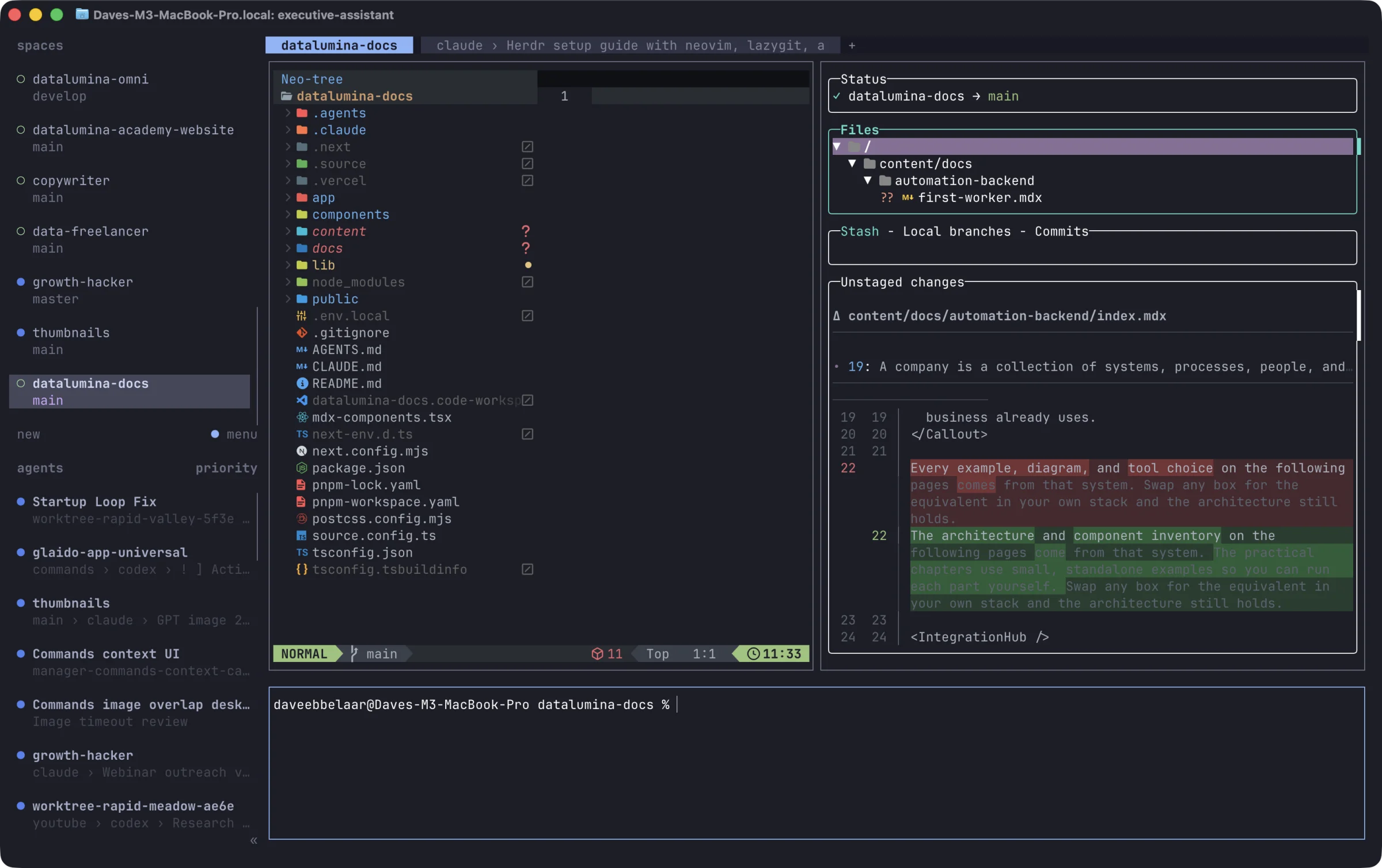
This is the code tab. Neovim with the file tree on the left, lazygit with the current diff on the right, and a shell below. All three are panes in one Herdr tab.
How it works
Neovim on its own is bare. LazyVim is a starter config that adds a plugin manager, language servers, a file tree, and sane defaults. Install it once, then override what you want in a few small Lua files.
~/.config/nvim/
  init.lua              loads config/lazy.lua
  lua/config/           options, keymaps, autocmds
  lua/plugins/          one file per plugin you add or change
Every file in lua/plugins/ returns a list of plugin specs, and LazyVim merges them with its own. Run nvim . in a project to open it. Press Space to see every keymap.
| OS | Config folder |
|---|---|
| macOS and Linux | ~/.config/nvim |
| Windows | %LOCALAPPDATA%\nvim |
Dave's setup
The goal is the VS Code explorer feel. A file tree on the left, single click to preview, double click to keep the file open, Ctrl+P to find files, Cmd-click to jump to a definition.
brew install neovim ripgrep fdBack up an existing config first. LazyVim installs its plugins on the first launch.
mv ~/.config/nvim ~/.config/nvim.bak 2>/dev/null
mkdir -p ~/.config/nvim/lua/config ~/.config/nvim/lua/plugins
Files
-- bootstrap lazy.nvim, LazyVim and your plugins
require("config.lazy")
Plugin manager
The extras add the file tree, language servers for Ctrl-click, and markdown support.
local lazypath = vim.fn.stdpath("data") .. "/lazy/lazy.nvim"
if not (vim.uv or vim.loop).fs_stat(lazypath) then
  local lazyrepo = "https://github.com/folke/lazy.nvim.git"
  local out = vim.fn.system({ "git", "clone", "--filter=blob:none", "--branch=stable", lazyrepo, lazypath })
  if vim.v.shell_error ~= 0 then
    vim.api.nvim_echo({
      { "Failed to clone lazy.nvim:\n", "ErrorMsg" },
      { out, "WarningMsg" },
      { "\nPress any key to exit..." },
    }, true, {})
    vim.fn.getchar()
    os.exit(1)
  end
end
vim.opt.rtp:prepend(lazypath)

require("lazy").setup({
  spec = {
    -- add LazyVim and import its plugins
    { "LazyVim/LazyVim", import = "lazyvim.plugins" },
    -- VS Code-style file tree (icons + click to open)
    { import = "lazyvim.plugins.extras.editor.neo-tree" },
    -- Language servers so Ctrl-click can jump to definitions
    { import = "lazyvim.plugins.extras.lang.typescript" },
    { import = "lazyvim.plugins.extras.lang.python" },
    { import = "lazyvim.plugins.extras.lang.rust" },
    { import = "lazyvim.plugins.extras.lang.json" },
    { import = "lazyvim.plugins.extras.lang.toml" },
    -- Pretty markdown while reading (render-markdown + browser preview)
    { import = "lazyvim.plugins.extras.lang.markdown" },
    -- import/override with your plugins
    { import = "plugins" },
  },
  defaults = {
    lazy = false,
    version = false, -- always use the latest git commit
  },
  install = { colorscheme = { "tokyonight", "habamax" } },
  checker = {
    enabled = true, -- check for plugin updates periodically
    notify = false, -- notify on update
  },
  performance = {
    rtp = {
      disabled_plugins = {
        "gzip",
        "tarPlugin",
        "tohtml",
        "tutor",
        "zipPlugin",
      },
    },
  },
})
Options and keymaps
-- Closer to VS Code while browsing: absolute line numbers, mouse, confirm on quit.
vim.opt.relativenumber = false
vim.opt.mouse = "a"
vim.opt.confirm = true
vim.opt.showtabline = 2

-- Wrap long lines in the editor pane instead of horizontal scroll.
vim.opt.wrap = true
vim.opt.linebreak = true
vim.opt.breakindent = true

-- Never open a directory listing in the main pane (neo-tree owns the tree).
vim.g.loaded_netrw = 1
vim.g.loaded_netrwPlugin = 1-- Git branch picker. Bare `c` stays the change operator (cw/cc/ciw).
vim.keymap.set("n", "<leader>gc", function()
Snacks.picker.git_branches()
end, { desc = "Git Branches" })
-- VS Code: Cmd+P / Ctrl+P: Quick Open. Space is the LazyVim leader.
vim.keymap.set("n", "<C-p>", function()
LazyVim.pick("files")()
end, { desc = "Find Files" })
-- VS Code: Cmd+Shift+F: Search in files. `/` is the same picker (not in-file search).
local function search_project()
LazyVim.pick("live_grep")()
end
vim.keymap.set("n", "<C-S-f>", search_project, { desc = "Search in Project" })
vim.keymap.set({ "n", "x" }, "/", search_project, { desc = "Search in Project" })
vim.keymap.set("n", "g/", "/", { noremap = true, desc = "Search in File" })
-- Cmd+E focuses Explorer. It does not hide it.
vim.keymap.set({ "n", "i", "x" }, "<D-e>", function()
require("neo-tree.command").execute({ action = "focus", dir = LazyVim.root() })
end, { desc = "Focus Explorer" })
-- VS Code: Ctrl/Cmd-click a symbol to go to its definition.
-- Silent if no language server is attached (don't spam vim.lsp warnings).
local function goto_definition_at_click()
vim.api.nvim_feedkeys(vim.api.nvim_replace_termcodes("<LeftMouse>", true, false, true), "nx", false)
vim.schedule(function()
if vim.bo.filetype == "neo-tree" then
return
end
local clients = vim.lsp.get_clients({ bufnr = 0 })
for _, client in ipairs(clients) do
local ok = false
if client.supports_method then
ok = client:supports_method("textDocument/definition")
end
if ok then
vim.lsp.buf.definition()
return
end
end
end)
end
vim.keymap.set("n", "<C-LeftMouse>", goto_definition_at_click, { desc = "Goto Definition", silent = true })
vim.keymap.set("n", "<D-LeftMouse>", goto_definition_at_click, { desc = "Goto Definition", silent = true })
vim.keymap.set("n", "<C-RightMouse>", "<C-o>", { desc = "Go Back", silent = true })local preview = require("vscode_preview")
local function is_dir_buf(buf)
local name = vim.api.nvim_buf_get_name(buf)
return name ~= "" and vim.fn.isdirectory(name) == 1
end
local function unlisted_scratch()
local scratch = vim.api.nvim_create_buf(false, true)
vim.bo[scratch].bufhidden = "wipe"
vim.bo[scratch].buftype = "nofile"
return scratch
end
-- `nvim .` would otherwise keep a directory buffer (netrw) in the main pane.
vim.api.nvim_create_autocmd("BufEnter", {
desc = "Don't keep directory buffers in the editor",
callback = function(event)
if not is_dir_buf(event.buf) then
return
end
vim.schedule(function()
if not vim.api.nvim_buf_is_valid(event.buf) then
return
end
if vim.api.nvim_get_current_buf() == event.buf then
vim.api.nvim_set_current_buf(unlisted_scratch())
end
pcall(vim.api.nvim_buf_delete, event.buf, { force = true })
preview.wipe_unnamed()
end)
end,
})
-- Explorer on the left, empty unlisted editor on the right (no [No Name] tab).
vim.api.nvim_create_autocmd("UIEnter", {
desc = "Open file explorer on startup",
callback = function()
local arg = vim.fn.argv(0)
local stat = arg ~= "" and vim.uv.fs_stat(arg) or nil
if arg ~= "" and (not stat or stat.type ~= "directory") then
return
end
vim.schedule(function()
local buf = vim.api.nvim_get_current_buf()
if is_dir_buf(buf) or vim.bo[buf].filetype == "netrw" then
vim.api.nvim_set_current_buf(unlisted_scratch())
pcall(vim.api.nvim_buf_delete, buf, { force = true })
end
preview.wipe_unnamed()
pcall(function()
require("neo-tree.command").execute({ action = "show", dir = vim.uv.cwd() })
end)
end)
end,
})Preview module
This module gives you the VS Code preview tab. A single click reuses one tab, a double click or an edit pins it.
-- VS Code-style preview editor: single-click reuses one tab, double-click pins it.

local M = {}
M.VAR = "vscode_preview"

local function is_tree_ft(ft)
  return ft == "neo-tree" or ft == "notify" or ft == "noice" or ft == "snacks_notif"
end

function M.editor_win(tree_win)
  for _, win in ipairs(vim.api.nvim_tabpage_list_wins(0)) do
    if win ~= tree_win then
      local buf = vim.api.nvim_win_get_buf(win)
      if not is_tree_ft(vim.bo[buf].filetype) then
        return win
      end
    end
  end
end

function M.find_preview()
  for _, buf in ipairs(vim.api.nvim_list_bufs()) do
    if vim.api.nvim_buf_is_valid(buf) and vim.b[buf][M.VAR] then
      return buf
    end
  end
end

function M.wipe_unnamed()
  for _, buf in ipairs(vim.api.nvim_list_bufs()) do
    if
      vim.api.nvim_buf_is_valid(buf)
      and vim.bo[buf].buflisted
      and vim.api.nvim_buf_get_name(buf) == ""
      and not vim.bo[buf].modified
      and vim.bo[buf].buftype == ""
    then
      local n = vim.api.nvim_buf_line_count(buf)
      local first = vim.api.nvim_buf_get_lines(buf, 0, 1, false)[1] or ""
      if n <= 1 and first == "" then
        for _, win in ipairs(vim.fn.win_findbuf(buf)) do
          local scratch = vim.api.nvim_create_buf(false, true)
          vim.bo[scratch].bufhidden = "wipe"
          vim.api.nvim_win_set_buf(win, scratch)
        end
        pcall(vim.api.nvim_buf_delete, buf, { force = true })
      end
    end
  end
end

local function ensure_editor_win(tree_win)
  local win = M.editor_win(tree_win)
  if win then
    return win
  end
  vim.cmd("wincmd l")
  if vim.api.nvim_get_current_win() == tree_win then
    vim.cmd("vsplit")
  end
  return vim.api.nvim_get_current_win()
end

local function load_file(path)
  path = vim.fs.normalize(vim.fn.fnamemodify(path, ":p"))
  local buf = vim.fn.bufnr(path)
  if buf <= 0 then
    buf = vim.fn.bufadd(path)
  end
  if not vim.api.nvim_buf_is_loaded(buf) then
    pcall(vim.fn.bufload, buf)
  end
  vim.bo[buf].buflisted = true
  return buf
end

function M.preview(path)
  local tree_win = vim.api.nvim_get_current_win()
  local win = ensure_editor_win(tree_win)
  local buf = load_file(path)

  -- Pinned tabs stay; just switch to them
  if vim.b[buf]._vscode_pinned then
    vim.api.nvim_win_set_buf(win, buf)
    vim.api.nvim_set_current_win(tree_win)
    M.wipe_unnamed()
    return
  end

  local old = M.find_preview()
  vim.b[buf][M.VAR] = true
  vim.api.nvim_win_set_buf(win, buf)
  vim.wo[win].wrap = true
  vim.wo[win].linebreak = true
  vim.wo[win].breakindent = true

  if old and old ~= buf and vim.api.nvim_buf_is_valid(old) and not vim.b[old]._vscode_pinned then
    vim.b[old][M.VAR] = nil
    if not vim.bo[old].modified and #vim.fn.win_findbuf(old) == 0 then
      pcall(vim.api.nvim_buf_delete, old, { force = false })
    end
  end

  vim.api.nvim_set_current_win(tree_win)
  M.wipe_unnamed()
end

function M.pin(path)
  local tree_win = vim.api.nvim_get_current_win()
  local win = ensure_editor_win(tree_win)
  local buf = load_file(path)
  vim.b[buf][M.VAR] = nil
  vim.b[buf]._vscode_pinned = true
  vim.bo[buf].buflisted = true
  vim.api.nvim_win_set_buf(win, buf)
  vim.wo[win].wrap = true
  vim.wo[win].linebreak = true
  vim.wo[win].breakindent = true
  vim.api.nvim_set_current_win(tree_win)
  M.wipe_unnamed()
end

function M.pin_buf(buf)
  buf = buf or vim.api.nvim_get_current_buf()
  vim.b[buf][M.VAR] = nil
  vim.b[buf]._vscode_pinned = true
end

function M.setup()
  vim.api.nvim_create_autocmd({ "InsertEnter", "BufModifiedSet" }, {
    desc = "Pin preview tab when you start editing",
    callback = function(event)
      if vim.b[event.buf][M.VAR] then
        M.pin_buf(event.buf)
      end
    end,
  })
end

return M
Folder colors
The file tree uses Nerd Font folder glyphs. Dave's real material_folders.lua is a generated 2,000 line table with a color per folder name. This short version uses one color and keeps the same interface, so explorer.lua works unchanged.
-- Nerd Font folder glyphs for neo-tree. Dave's full version maps folder
-- names to Material Icon Theme colors; this one uses a single color.
local M = {}
M.default_color = "#90a4ae"
M.folder_closed = ""
M.folder_open = ""
function M.icon_for(_, opened)
local glyph = opened and M.folder_open or M.folder_closed
return glyph, M.default_color
end
return MPlugins
The theme is Atom One Dark on the Ghostty background from the terminal page.
-- Atom One Dark syntax (same as VS Code) on Ghostty's background
-- so the editor sits flush in the terminal.

return {
  {
    "navarasu/onedark.nvim",
    lazy = false,
    priority = 1000,
    opts = {
      style = "dark", -- classic Atom One Dark highlighting
      term_colors = false,
      ending_tildes = false,
      colors = {
        -- Ghostty background only; syntax colors stay Atom One Dark
        bg0 = "#1D1E27",
        bg_d = "#18191F",
        bg1 = "#282c34",
        bg2 = "#31353f",
        bg3 = "#393f4a",
      },
      highlights = {
        Normal = { fg = "$fg", bg = "$bg0" },
        NormalNC = { fg = "$fg", bg = "$bg0" },
        NormalFloat = { fg = "$fg", bg = "$bg1" },
        FloatBorder = { fg = "$grey", bg = "$bg1" },
        SignColumn = { bg = "$bg0" },
        EndOfBuffer = { fg = "$bg0", bg = "$bg0" },
        WinSeparator = { fg = "$bg1", bg = "$bg0" },
        NeoTreeNormal = { fg = "$fg", bg = "$bg0" },
        NeoTreeNormalNC = { fg = "$fg", bg = "$bg0" },
        NeoTreeEndOfBuffer = { fg = "$bg0", bg = "$bg0" },
        NeoTreeWinSeparator = { fg = "$bg0", bg = "$bg0" },
        NeoTreeVertSplit = { fg = "$bg0", bg = "$bg0" },
      },
    },
    config = function(_, opts)
      require("onedark").setup(opts)
      require("onedark").load()
    end,
  },
  {
    "LazyVim/LazyVim",
    opts = {
      colorscheme = "onedark",
    },
  },
}
The explorer wires the mouse. Single click previews, double click pins, Enter opens the file and moves the cursor into it.
-- Persistent VS Code-style explorer.
local preview = require("vscode_preview")
local folders = require("material_folders")
local hl_defined = {}
local function folder_hl(color)
local name = "MaterialFolder" .. color:gsub("#", "")
if not hl_defined[name] then
vim.api.nvim_set_hl(0, name, { fg = color })
hl_defined[name] = true
end
return name
end
local function skip_root(node)
return not node or node:get_depth() == 1
end
local function on_single_click(state)
local node = state.tree:get_node()
if skip_root(node) then
return
end
if node.type == "directory" then
require("neo-tree.sources.filesystem.commands").toggle_node(state)
return
end
if node.type == "file" then
preview.preview(node.path)
end
end
-- Enter: open the file and move the cursor into it (keyboard flow).
local function on_enter(state)
local node = state.tree:get_node()
if skip_root(node) then
return
end
if node.type == "directory" then
require("neo-tree.sources.filesystem.commands").toggle_node(state)
return
end
if node.type == "file" then
local tree_win = vim.api.nvim_get_current_win()
preview.pin(node.path)
local win = preview.editor_win(tree_win)
if win then
vim.api.nvim_set_current_win(win)
end
end
end
local function on_double_click(state)
local node = state.tree:get_node()
if skip_root(node) then
return
end
if node.type == "directory" then
require("neo-tree.sources.filesystem.commands").toggle_node(state)
return
end
if node.type == "file" then
preview.pin(node.path)
end
end
-- Keyboard crawl: j/k previews the file under the cursor, same as a click.
local preview_seq = 0
local function preview_under_cursor()
if vim.bo.filetype ~= "neo-tree" then
return
end
preview_seq = preview_seq + 1
local seq = preview_seq
vim.defer_fn(function()
if seq ~= preview_seq or vim.bo.filetype ~= "neo-tree" then
return
end
local ok, manager = pcall(require, "neo-tree.sources.manager")
if not ok then
return
end
local state = manager.get_state("filesystem")
if not state or not state.tree or state.winid ~= vim.api.nvim_get_current_win() then
return
end
local node = state.tree:get_node()
if skip_root(node) or node.type ~= "file" then
return
end
preview.preview(node.path)
end, 40)
end
return {
{
"nvim-neo-tree/neo-tree.nvim",
init = function()
preview.setup()
vim.api.nvim_create_autocmd("ColorScheme", {
callback = function()
hl_defined = {}
end,
})
vim.api.nvim_create_autocmd("FileType", {
pattern = "neo-tree",
callback = function(event)
vim.api.nvim_create_autocmd("CursorMoved", {
buffer = event.buf,
callback = preview_under_cursor,
})
end,
})
end,
opts = {
default_component_configs = {
icon = {
folder_closed = folders.folder_closed,
folder_open = folders.folder_open,
folder_empty = "",
folder_empty_open = "",
use_filtered_colors = false,
provider = function(icon, node)
if node.type == "directory" then
local glyph, color = folders.icon_for(node.name, node:is_expanded())
icon.text = glyph
icon.highlight = folder_hl(color)
elseif node.type == "file" or node.type == "terminal" then
local ok, devicons = pcall(require, "nvim-web-devicons")
if ok then
local name = node.type == "terminal" and "terminal" or node.name
local devicon, hl = devicons.get_icon(name)
icon.text = devicon or icon.text
icon.highlight = hl or icon.highlight
end
end
return icon
end,
},
},
filesystem = {
hijack_netrw_behavior = "open_default",
follow_current_file = { enabled = true },
filtered_items = {
visible = true,
hide_dotfiles = false,
hide_gitignored = true,
hide_hidden = false,
never_show = { ".git", ".DS_Store" },
},
components = {
name = function(config, node, state)
if node:get_depth() == 1 then
node.name = vim.fn.fnamemodify(node.path, ":t")
end
return require("neo-tree.sources.common.components").name(config, node, state)
end,
},
},
window = {
width = 34,
mappings = {
["<cr>"] = on_enter,
["<LeftRelease>"] = on_single_click,
["<2-LeftMouse>"] = on_double_click,
-- Keep `/` as project search, not neo-tree's filter.
["/"] = "none",
},
},
},
},
}-- Always show the filename tab, even with a single file.
return {
{
"akinsho/bufferline.nvim",
opts = {
options = {
always_show_bufferline = true,
},
},
},
}Python projects activate their own .venv on open, and Pyright stays quiet about types.
-- Auto-activate project .venv (same idea as VS Code's Python: Select Interpreter).

local function find_venv_python(start)
  local path = start
  while path and path ~= "" do
    for _, rel in ipairs({ ".venv/bin/python", "venv/bin/python" }) do
      local candidate = path .. "/" .. rel
      if vim.uv.fs_stat(candidate) then
        return candidate
      end
    end
    local parent = vim.fs.dirname(path)
    if parent == path then
      break
    end
    path = parent
  end
end

local function activate_project_venv(buf)
  local ok, vs = pcall(require, "venv-selector")
  if not ok then
    return
  end
  if vs.python() then
    return
  end
  local name = vim.api.nvim_buf_get_name(buf)
  local py = find_venv_python(name ~= "" and vim.fs.dirname(name) or vim.uv.cwd())
  if py then
    vs.activate_from_path(py, "venv")
  end
end

return {
  {
    "linux-cultist/venv-selector.nvim",
    opts = {
      options = {
        notify_user_on_venv_activation = true,
        cached_venv_automatic_activation = true,
      },
    },
    config = function(_, opts)
      require("venv-selector").setup(opts)
      vim.api.nvim_create_autocmd("FileType", {
        pattern = "python",
        callback = function(event)
          vim.schedule(function()
            activate_project_venv(event.buf)
          end)
        end,
      })
    end,
  },
  {
    "neovim/nvim-lspconfig",
    opts = {
      servers = {
        -- Cursor/VS Code: python.languageServer = "None", formatter = Ruff.
        -- Keep Pyright for Ctrl-click / hover, but don't surface type errors.
        pyright = {
          settings = {
            python = {
              analysis = {
                typeCheckingMode = "off",
                autoSearchPaths = true,
                useLibraryCodeForTypes = true,
                diagnosticMode = "openFilesOnly",
              },
            },
          },
        },
      },
    },
  },
}
Daily use
Open a new Herdr tab in the project and run nvim .. On Windows, Cmd-click and Cmd+E become Ctrl-click and Ctrl+E.
| Action | Keys |
|---|---|
| Preview a file | Click it, or move over it with j and k |
| Keep a file open | Double click, or press Enter |
| Find a file | Ctrl+P |
| Search the project | Ctrl+Shift+F, or / |
| Search inside the file | g then / |
| Go to definition | Cmd-click or Ctrl-click |
| Go back | Ctrl-right-click |
| Focus the tree | Cmd+E |
| Switch git branch | Space, g, c |
| Quit | :q |
Check
Run nvim . in a repo. Wait for LazyVim to install its plugins, then quit and open it again. Click a file in the tree. It opens on the right and the cursor stays in the tree.