

Ask the handbook
Chat with handbook
Ask follow-up questions with OpenAI and cite pages found through Sanity semantic search.
This stage is optional. Your handbook and Sanity search already work without OpenAI. Add an OpenAI key to let the existing chat panel answer from retrieved pages and remember chats in your browser.
Keep CONTENT_SOURCE=sanity for the semantic-search flow shown here. Chat can also run in local mode, but then it retrieves documents with keyword search. The OpenAI key enables answers; it does not choose the content source.
Connect OpenAI
Create an account on the OpenAI platform, select a project, and configure API billing. Create a secret key in API keys. Add it to your existing environment file.
OPENAI_API_KEY=your-openai-api-key
OPENAI_MODEL=gpt-5.6-luna
Restart npm run dev. The key stays on the server. GPT-5.6 Luna is the default and supports function calling through the Responses API. The route explicitly sets reasoning effort to none on both calls to keep responses quick. You can change the model in this file; check its supported parameters in the OpenAI model documentation.
Ask and follow up
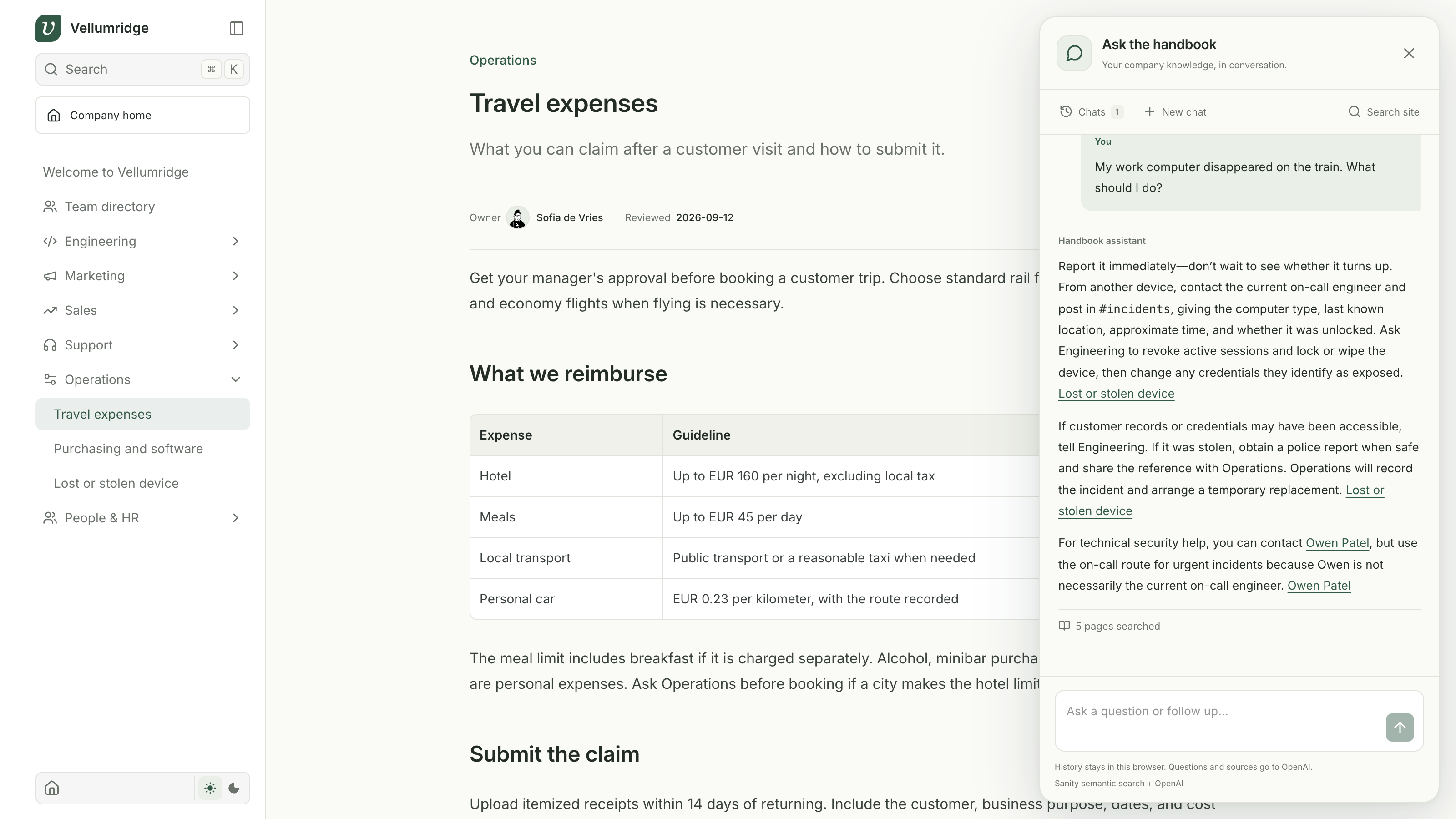
Click Ask the handbook in the bottom-right corner. Try these two questions in the same chat.
What can I claim for meals after visiting a customer?
How long do I have to submit the claim?
The second question depends on the first. The assistant uses the conversation to search for the travel claim deadline, then links to Travel expenses. Open that page and check the EUR 45 daily meal limit and 14-day submission deadline.
Ask Who handles custom customer payment terms? to find Daniel Brooks in Finance. His name should link to his profile, where you can check his responsibilities.
Use New chat to change topics. Chats lets you resume or delete conversations, and Search site opens the existing Fumadocs overlay. Expand Pages searched under an answer to inspect the query and retrieved candidates.
Follow the request
Open lib/chat.mjs to inspect the single tool definition. app/api/chat/route.ts runs that tool through lib/retrieval.ts, which the search overlay also uses. OpenAI chooses the search text; the server controls the Sanity query and never gives the model the Sanity token.
The answer prompt asks for citations and tells the model to say when the handbook lacks the requested policy. Source links help you check an answer, but a generated claim can still be wrong. In local mode, the same chat uses keyword retrieval; switch CONTENT_SOURCE to sanity for semantic retrieval.
Keep history local
components/chat.tsx stores up to 10 chats with 40 messages each in localStorage. Refreshing restores them. The app sends the most recent 12 completed messages to OpenAI and has no server conversation database.
Local history is not local inference. OpenAI receives the messages and retrieved pages, and Sanity receives the search query. Requests use store: false; provider handling still follows OpenAI's API data controls. Chats remain on this browser after locking the site, so use Clear all on a shared device.
Vercel AI SDK
This example uses a custom React panel and calls OpenAI's Responses API directly with fetch. It does not use the Vercel AI SDK. The SDK is a TypeScript library for building AI applications; OpenAI still supplies the model.
The AI SDK Next.js guide is a useful next step if you want to expand the chat. It can replace some of the code we maintain ourselves.
| In this example | With the AI SDK |
|---|---|
| Read streaming events and update messages manually | streamText and useChat handle streaming and conversation state |
| Request a search tool call, execute it, then request an answer | A server tool and a bounded multi-step flow handle the tool result |
Call OpenAI directly with fetch | A provider package handles model requests through a shared interface |
Our Sanity query, source-link rules, password gate, and panel design would still be part of the app. History also remains our responsibility. The SDK accepts saved messages, but it does not automatically save chats to localStorage. See message persistence.
Keep the current implementation for this walkthrough. If you later add providers or more tools, the SDK can reduce the streaming code you maintain. Start with its tool-calling guide and reuse searchKnowledge() from lib/retrieval.ts inside the tool.
The SDK quickstart uses Vercel AI Gateway, but that is optional. The OpenAI provider can use your existing OPENAI_API_KEY directly. You can keep running locally. A migration should preserve reasoning set to none, store: false, source links, and browser history.
Sanity's guidance
Sanity Context offers an MCP endpoint for AI applications to retrieve content with Sanity tools. This example uses one fixed search tool directly against Dataset Embeddings. You can inspect the full request flow without setting up another integration.
Keep the first version here. Add a broader tool interface only when the assistant needs more than handbook search.
Checkpoint
Ask the meal question and its follow-up, verify the cited page, then refresh and reopen the saved chat. Start a second conversation and delete it from Chats. If a request fails, the panel preserves the question and offers Retry answer.
Continue to Adapt and deploy.