

Connect Sanity
Semantic search
Compare keyword, semantic, and hybrid search over the same company policies.
A colleague asks about a computer left on a train. The policy is called Lost or stolen device. Semantic search can connect the question to the policy even when the wording differs.
Before trying the search modes, finish Sanity setup, set CONTENT_SOURCE=sanity, and restart the website. If the overlay still says Local keyword search, it is reading the local files. Adding a token alone does not enable semantic search.
What Sanity handles
Semantic search usually means creating embeddings, storing them, and keeping them in sync with your content. Sanity handles that work alongside the documents already in Content Lake. We use it so the team can edit the handbook in one place and search that same content.
The two rows below happen at different times. Sanity prepares the content embeddings after setup and updates them as documents change. When someone searches, it embeds their question and compares it with those stored vectors.
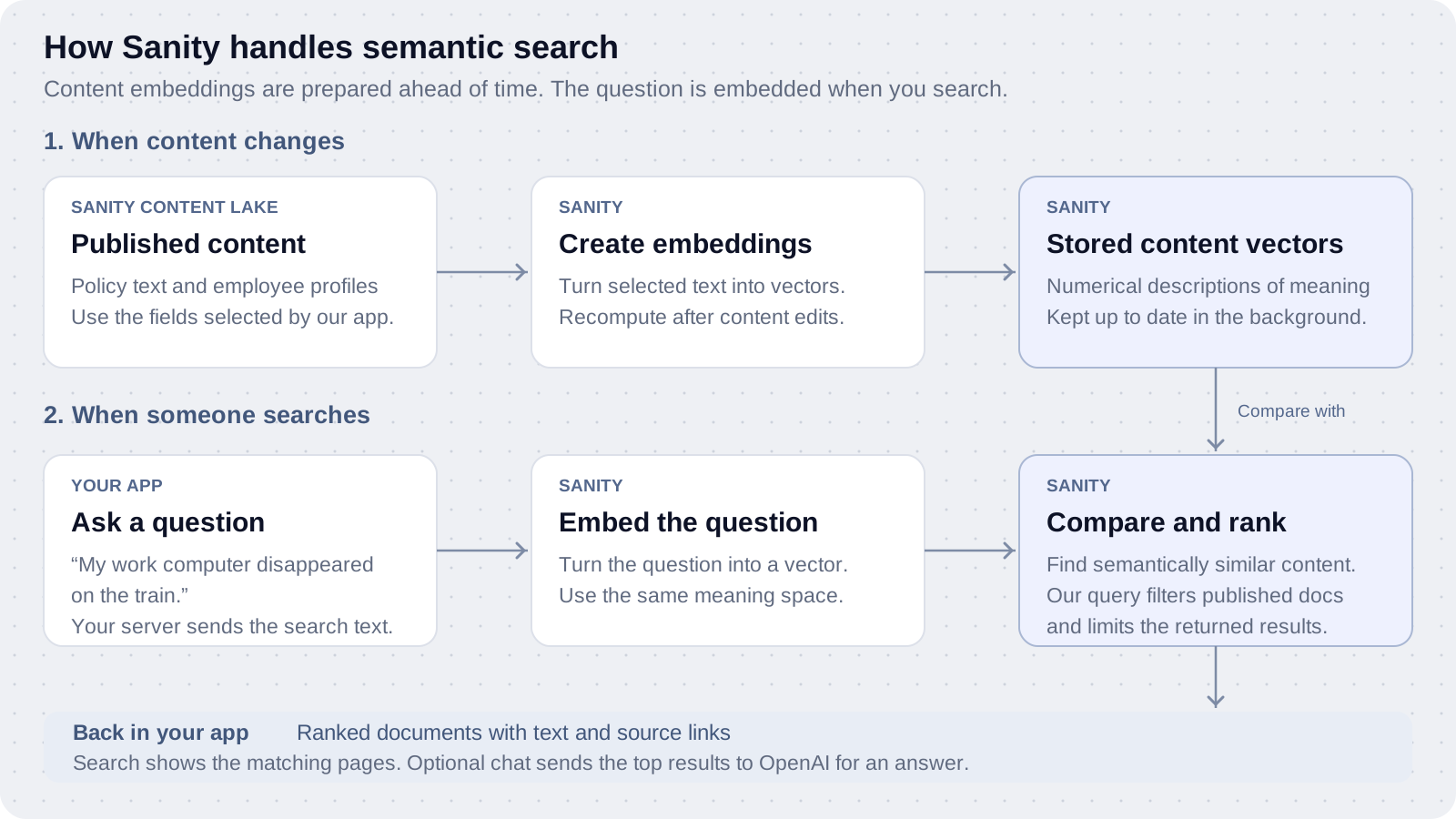
A vector is a list of numbers that represents meaning. This is how a question about a computer disappearing can match Lost or stolen device without using the same words.
Sanity manages the embedding model and search infrastructure. We do not need a separate embedding API key, vector database, or synchronization job. Updates are asynchronous, so an edited page can be visible before its new embeddings are ready. Dataset Embeddings.
What our app does
Our setup script enables embeddings and selects the fields. The website uses Sanity's query language, with text::semanticSimilarity() inside score(). We still build the interface and control the filters and result limit. Hybrid search adds keyword matching to the same query.
The search overlay returns up to eight matching documents. For chat, our server takes the top five semantic results and sends their text and source links to OpenAI to write an answer. Sanity retrieves the knowledge; OpenAI writes the response. The chat lesson covers that next step.
Sanity's query language is separate from Groq, the AI inference provider. You do not need a Groq account or API key. Embedding generation and updates are included; semantic queries use your Sanity search allowance. OpenAI chat has separate API costs. Search billing.
Your browser sends the search text to our Next.js server, which checks the password cookie and queries Sanity. The API token stays on the server. Search waits briefly after typing, cancels obsolete browser requests, and displays an error if Sanity is unavailable.
Inspect the query
The hybrid branch of searchQuery() searches both knowledge pages and employees. The result projection gives them the same title, description, path, and body fields.
*[(_type == "knowledgePage" && !(_id in path("drafts.**")) && !(_id in path("versions.**"))) || (_type == "employee" && !(_id in path("drafts.**")) && !(_id in path("versions.**")))]
    | score(boost(([title, description, body, name, role, bio] match text::query($searchText)) || (responsibilities match text::query($searchText)), 0.5), text::semanticSimilarity($searchText))
    | order(_score desc)[_score > 0][0...8]
    { _id, "title": coalesce(title, name), "description": coalesce(description, role),
      "slug": select(_type == "employee" => "team/" + slug, slug), department,
      "owner": coalesce(ownerProfile->name, owner, name), updated, order,
      "body": coalesce(body, name + " is the " + role + ". " + bio + " Responsibilities: " + array::join(responsibilities, "; ")), _score }
The search text is passed as a parameter. 0.5 is the keyword weight chosen for these example pages. Change it only after testing your own queries.
The embedding projection selects page text and employee names, roles, bios, and responsibilities. You can change those fields in lib/sanity.mjs and rerun npm run sanity:setup to update the dataset settings.
Compare the modes
Open the search overlay with Cmd+K or Ctrl+K. The tabs select which scoring expressions run against the same content.
| Try this | What to look for |
|---|---|
Who should I ask about using a customer logo? | Look for Noah Ellis and the Customer stories policy. |
SEV-1 | An exact identifier should find Incident response. |
My work computer disappeared on the train | Semantic search should find Lost or stolen device. |
Who signs off on a cheaper quote? | Discount approvals should outrank an unrelated Time off page. |
Can I spend December working from Lisbon? | Remote work explains approval and day limits. |
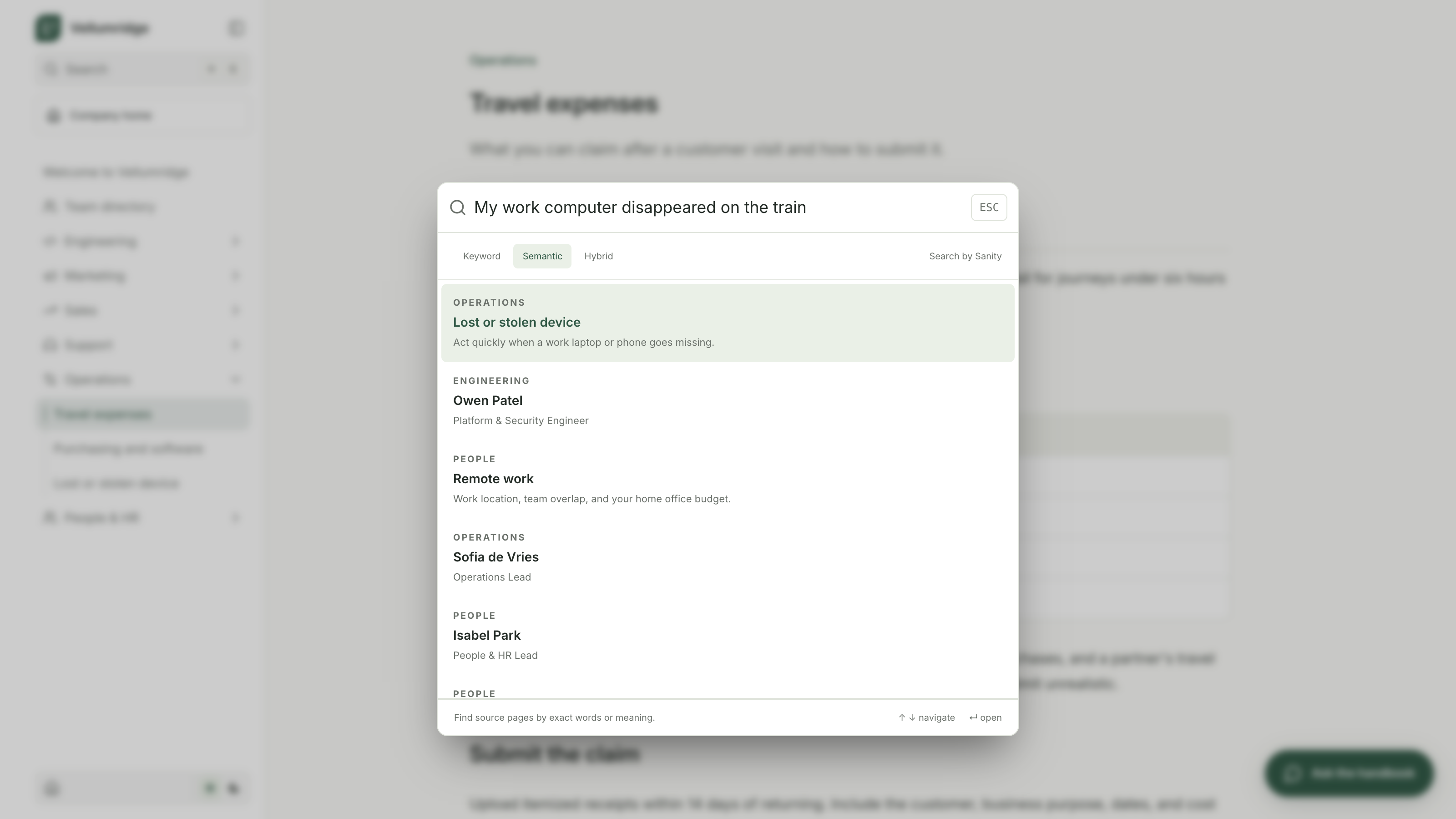
On the verified demo, semantic search puts Lost or stolen device first for the missing-computer question. Hybrid puts it near the top but can rank Remote work ahead of it. Use that difference to explain tuning. Combining scores does not guarantee a better first result for every query.
Clicking a search result opens a policy. The separate chat panel can use those pages to generate an answer. Semantic search can return weakly related pages even when the handbook does not contain the requested information.
Checkpoint
Compare at least one exact identifier and one paraphrased question. Open the matching result and confirm the policy supports the answer you expected.
If you see no semantic results just after import, wait and check npm run sanity:status again. If you see an error, verify the project, dataset, token, and embedding settings. Keyword mode helps isolate embedding issues. Sanity's search guide explains the scoring expressions.
Continue to Chat with handbook to add follow-up questions and source-linked answers.