

Build the handbook
Understand the layout
Trace the homepage, sidebar, content, and people in the complete example.
Trace the homepage, departments, and people, then change a policy. Keep CONTENT_SOURCE=local while working through this page so edits to the starter content appear in the browser. Use Project structure when you need to find a file.
Separate content from layout
The plain Fumadocs starter uses MDX. This example uses .md files for policies and JSON files for people, so the same simple content can later be imported into Sanity.
Fumadocs still supplies the sidebar and reading layout. Our content loader gives it a list of pages, and react-markdown displays the body. The handbook does not execute React components or raw HTML from its content.
Understand the structure
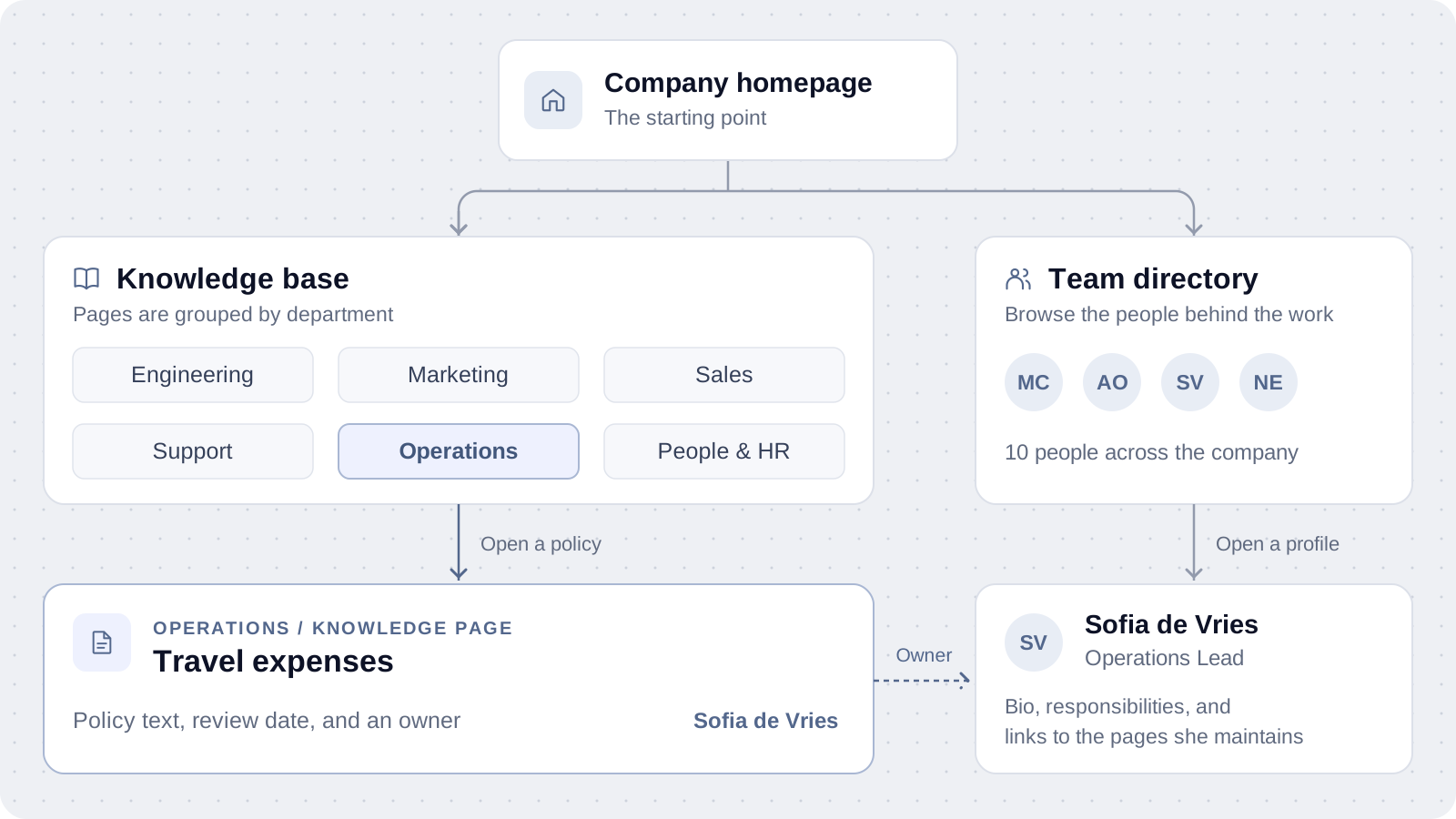
Follow the highlighted example from Operations to Travel expenses. Its owner link opens Sofia's profile, which you can also find through the team directory. Click the diagram to zoom in.
Each department groups related knowledge pages. Every page has a title, short description, owner, review date, ordering number, and body. A person's profile has a role, bio, and responsibilities.
The local folder supplies a page's department and path. In Sanity, those become fields on the page document. Departments themselves stay defined in code in this demo.
The homepage layout stays in code. Its employee and guide counts come from the selected content source.
Follow one page
---
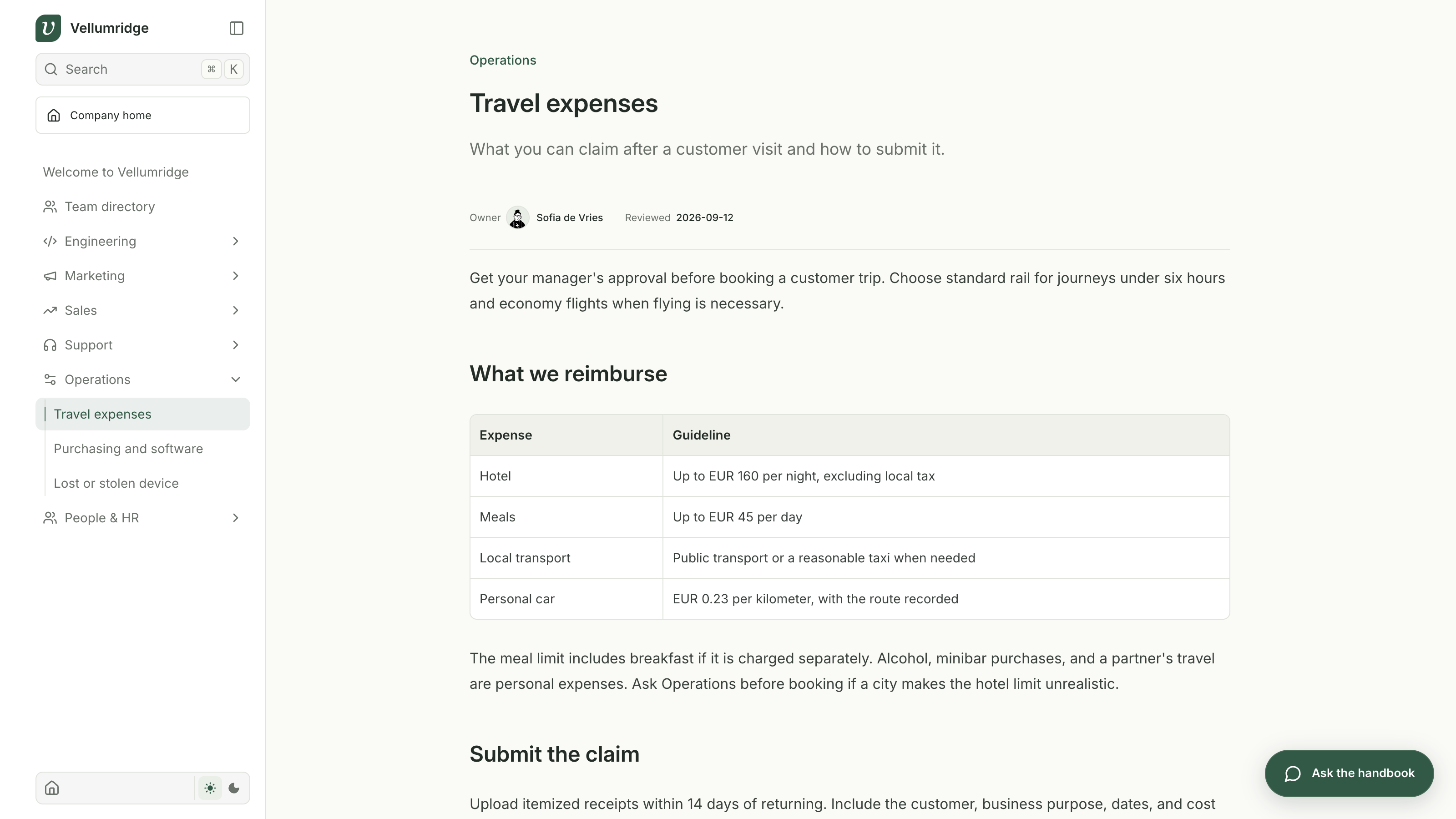
title: "Travel expenses"
description: "What you can claim after a customer visit and how to submit it."
owner: "Sofia de Vries"
updated: "2026-09-12"
order: 1
---

Get your manager's approval before booking a customer trip.

## Submit the claim

Upload itemized receipts within 14 days of returning.
The path becomes /docs/operations/travel-expenses. The number in order controls its position within Operations, with lower numbers appearing first. Keep dates quoted.
The content loader adds the policy to the sidebar and the shared page template displays it. You do not need to maintain a second sidebar list for each new policy.
Try a small change
Change a sentence in content/docs/operations/travel-expenses.md, save, and refresh the page. Then change the homepage headline in app/page.tsx to see the difference between content and layout. Restore your practice edits before continuing so the later examples still match, especially the EUR 45 meal limit.
Try this prompt with your coding assistant.
Read AGENTS.md and explain how Travel expenses reaches the sidebar and page.
Show me where its body, owner, and ordering come from.
Then help me change the homepage headline and one policy sentence.
Keep CONTENT_SOURCE=local and avoid adding dependencies.
npm test
# Checks the content, links, employee profiles, and supporting app behavior.When Sanity helps
Local files work well when the people maintaining the handbook are comfortable editing a repository. If a People & HR colleague needs to update a policy through an editor, Sanity Studio gives them a place to do that.
We will import the content into Sanity's hosted Content Lake. The same website will read published documents from there, and Dataset Embeddings will make their text searchable by meaning. You keep the Fumadocs layout you already understand. There is no second branch to check out or new website to build; an environment setting chooses the content source.
Checkpoint
You can find the homepage, explain how Operations gets its sidebar pages, and identify the content behind an owner profile. Continue to Sanity setup.